'%20stroke-width='1.5'/%3e%3cg%20fill='%231be0c6'%3e%3cpath%20d='m32.25%2029h1.5v6h-1.5z'/%3e%3cpath%20d='m36%2033h-6l3%204z'/%3e%3c/g%3e%3c/svg%3e)
'%20stroke-width='1.5'/%3e%3cpath%20fill-rule='evenodd'%20clip-rule='evenodd'%20d='M35.125%2029H35V27.5H33.5V29H32.5V27.5H31V29H30.5H29V30.5V32.25V33.75V35.5V37H30.5H31V38.5H32.5V37H33.5V38.5H35V37H35.125C36.4367%2037%2037.5%2035.9367%2037.5%2034.625C37.5%2033.9964%2037.2558%2033.4248%2036.8571%2033C37.2558%2032.5752%2037.5%2032.0036%2037.5%2031.375C37.5%2030.0633%2036.4367%2029%2035.125%2029ZM30.5%2030.5H35.125C35.6082%2030.5%2036%2030.8918%2036%2031.375C36%2031.8582%2035.6082%2032.25%2035.125%2032.25H30.5V30.5ZM35.125%2033.75H30.5V35.5H35.125C35.6082%2035.5%2036%2035.1082%2036%2034.625C36%2034.1418%2035.6082%2033.75%2035.125%2033.75Z'%20fill='%231BE0C6'/%3e%3cdefs%3e%3clinearGradient%20id='paint0_linear_11576_70700'%20x1='23'%20y1='33'%20x2='43'%20y2='33'%20gradientUnits='userSpaceOnUse'%3e%3cstop%20stop-color='%231D56F5'/%3e%3cstop%20offset='1'%20stop-color='%2300B3F5'/%3e%3c/linearGradient%3e%3c/defs%3e%3c/svg%3e)
'%3e%3cpath%20d='m37.5%2019.3118v-2.644l-12.217-5.4178-1.1977.5312v24.7294l1.1977.5312%201.1977-.5311v-11.0169h3.2v-2.4433h-3.2v-8.604l5.7055%202.5191v17.0149l2.3953-1.0623v-14.8949z'/%3e%3cpath%20d='m15.7559%2015.475%203.3901%2011.0263v-12.5297l2.3954-1.0623v22.4732l-2.3954-1.0623v-.1142l-.1253.0386-3.5579-11.5721v10.0143l-2.3954-1.0623v-14.9572z'/%3e%3c/g%3e%3c/svg%3e)
'/%3e%3cpath%20d='M32.5%2034.4883H37.5'%20stroke='%231BE0C6'%20stroke-width='1.5'/%3e%3cdefs%3e%3clinearGradient%20id='paint0_linear_8794_15706'%20x1='27'%20y1='34.2943'%20x2='44.0549'%20y2='34.2943'%20gradientUnits='userSpaceOnUse'%3e%3cstop%20stop-color='%231D56F5'/%3e%3cstop%20offset='1'%20stop-color='%2300B3F5'/%3e%3c/linearGradient%3e%3c/defs%3e%3c/svg%3e)
'%20stroke-width='1.5'/%3e%3cpath%20d='M31%2031H39'%20stroke='%231BE0C6'%20stroke-width='1.5'/%3e%3cdefs%3e%3clinearGradient%20id='paint0_linear_1223_27506'%20x1='25'%20y1='39.5488'%20x2='37.8691'%20y2='17.1844'%20gradientUnits='userSpaceOnUse'%3e%3cstop%20stop-color='%233165F5'/%3e%3cstop%20offset='1'%20stop-color='%231DBBF5'/%3e%3c/linearGradient%3e%3c/defs%3e%3c/svg%3e)
'%20stroke-width='1.5'/%3e%3crect%20x='32'%20y='29.75'%20width='1.5'%20height='6'%20fill='%231BE0C6'/%3e%3cdefs%3e%3clinearGradient%20id='paint0_linear_26_143'%20x1='23'%20y1='41.5488'%20x2='35.8691'%20y2='19.1844'%20gradientUnits='userSpaceOnUse'%3e%3cstop%20stop-color='%233165F5'/%3e%3cstop%20offset='1'%20stop-color='%231DBBF5'/%3e%3c/linearGradient%3e%3c/defs%3e%3c/svg%3e)
'%20stroke-width='1.5'/%3e%3cpath%20d='M35.9611%2028H32.7286L29.9999%2033.76H32.2652L31.3974%2038L35.9999%2032.6323H32.9632L35.9611%2028Z'%20fill='%231BE0C6'/%3e%3cdefs%3e%3clinearGradient%20id='paint0_linear_6189_76518'%20x1='23'%20y1='41.5488'%20x2='35.8691'%20y2='19.1844'%20gradientUnits='userSpaceOnUse'%3e%3cstop%20stop-color='%233165F5'/%3e%3cstop%20offset='1'%20stop-color='%231DBBF5'/%3e%3c/linearGradient%3e%3c/defs%3e%3c/svg%3e) Get Started
Get Started'%20fill='url(%23paint0_linear_26_134)'/%3e%3cdefs%3e%3clinearGradient%20id='paint0_linear_26_134'%20x1='35.2581'%20y1='35.6239'%20x2='35.445'%20y2='33.3493'%20gradientUnits='userSpaceOnUse'%3e%3cstop%20stop-color='%233165F5'/%3e%3cstop%20offset='1'%20stop-color='%231DBBF5'/%3e%3c/linearGradient%3e%3c/defs%3e%3c/svg%3e) Tutorials
Tutorials'%20stroke-width='1.5'/%3e%3cpath%20d='M16%2033C16%2033%2018.5%2030%2024%2030C29.5%2030%2032%2033%2032%2033'%20stroke='%231BE0C6'%20stroke-width='1.5'/%3e%3cdefs%3e%3clinearGradient%20id='paint0_linear_3104_84810'%20x1='19'%20y1='26.3658'%20x2='28.5193'%20y2='13.6404'%20gradientUnits='userSpaceOnUse'%3e%3cstop%20stop-color='%233165F5'/%3e%3cstop%20offset='1'%20stop-color='%231DBBF5'/%3e%3c/linearGradient%3e%3c/defs%3e%3c/svg%3e) Expert Reviews
Expert Reviews'%20stroke-width='1.5'/%3e%3crect%20x='27'%20y='33'%20width='6'%20height='1.5'%20fill='%231BE0C6'/%3e%3cdefs%3e%3clinearGradient%20id='paint0_linear_1223_27321'%20x1='17.75'%20y1='37.9878'%20x2='20.3947'%20y2='37.8395'%20gradientUnits='userSpaceOnUse'%3e%3cstop%20stop-color='%233165F5'/%3e%3cstop%20offset='1'%20stop-color='%231DBBF5'/%3e%3c/linearGradient%3e%3c/defs%3e%3c/svg%3e)


Device Verification Guarantee
With our simple Device Verification tool, you can double check and ensure your Keystone 3 Pro device or downloaded firmware isn't corrupted.
 Protect yourself against any Supply Chain Attack
 Ensure no Browser Hijacking or Tampering occurred when you downloaded your firmware update
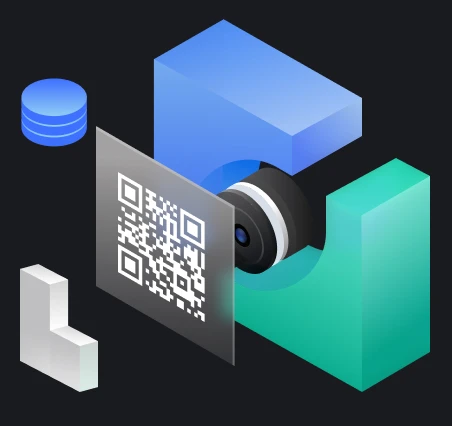
1
Scan QR code
2
Input the
verification code
verification code
3
Get Result
Frequently Asked Questions
My device passed verification - does this mean I no longer need to worry about security?
Passing device verification confirms that your hardware and firmware are genuine and untampered, which is an important security foundation. However, security is multi-layered. You should also:
1) Store your seed phrase safely - a metal medium like Keystone Tablet Plus is recommended for permanent storage;
2) Set a strong PIN and never share it with anyone;
3) Regularly update firmware to get the latest security fixes;
4) Only download firmware and software from official channels.
1) Store your seed phrase safely - a metal medium like Keystone Tablet Plus is recommended for permanent storage;
2) Set a strong PIN and never share it with anyone;
3) Regularly update firmware to get the latest security fixes;
4) Only download firmware and software from official channels.
Will device verification expose my private key or seed phrase?
Absolutely not. Device verification is based on a cryptographic signature mechanism. The entire verification process only involves publicly available device identification information and does not expose your private key, seed phrase, or any sensitive data in any way. Keystone's design philosophy is zero data retention - private keys never leave the device.
What does a failed device verification mean? What should I do?
A failed verification may indicate that the device firmware has been tampered with, the device is counterfeit, or there is a supply chain attack risk. If this occurs, immediately stop using the device and do not perform any operations on it - especially do not enter your seed phrase. Save a screenshot or record of the failed verification result and immediately contact the official Keystone support team at support@keyst.one to report the issue.
When should I perform device verification? Does it only need to be done once?
Device verification is recommended at the following key moments:
1) Upon receiving a new device, before first boot;
2) After the device has been unused for a long time or kept by someone else;
3) Whenever you have any doubts about the device's origin.
While it is not mandatory to verify before every use, performing it regularly is a good security practice.
1) Upon receiving a new device, before first boot;
2) After the device has been unused for a long time or kept by someone else;
3) Whenever you have any doubts about the device's origin.
While it is not mandatory to verify before every use, performing it regularly is a good security practice.
What is the device verification process? How long does it take?
The verification process is very simple, with three steps:
1) Use your device to scan the QR code on the webpage;
2) Enter the verification code displayed on your device into the verification tool on this page;
3) Wait for the system to return the verification result. The entire process usually takes only 1-2 minutes. If the result shows 'Verification passed,' it means your device is genuine and has not been tampered with; if verification fails, please contact official customer support immediately (support@keyst.one).
1) Use your device to scan the QR code on the webpage;
2) Enter the verification code displayed on your device into the verification tool on this page;
3) Wait for the system to return the verification result. The entire process usually takes only 1-2 minutes. If the result shows 'Verification passed,' it means your device is genuine and has not been tampered with; if verification fails, please contact official customer support immediately (support@keyst.one).
What is Device Verification and why do I need it?
Device Verification is a security tool provided by Keystone to confirm that your device and firmware are genuine and have not been tampered with. It defends against Supply Chain Attacks, where the device may be maliciously modified between factory and delivery.
'/%3e%3crect%20x='18'%20y='59'%20width='44'%20height='1.5'%20fill='%2383868F'/%3e%3ccircle%20cx='29'%20cy='15'%20r='2'%20fill='%23E0516E'%20fill-opacity='0.24'/%3e%3ccircle%20cx='51'%20cy='15'%20r='2'%20fill='%23E0516E'%20fill-opacity='0.24'/%3e%3c/svg%3e)