Step1: Preparations
1.Charge Your Battery
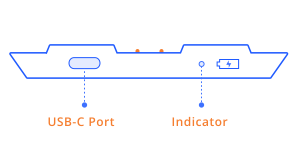
Rechargeable pack (Keystone Pro only):
To charge the rechargeable lithium battery, utilize the USB-C cable provided in the package, which solely supports only USB type A to USB type C cables. Additionally, you will also need a 5V1A or 5V2A charger, which is not included.It takes around 3 hours to fully charge the battery. The light indicator on the battery turns white when it's partially charged and yellow when fully charged.
Note: The Keystone Essential does not come with the rechargeable battery.
Note: The Keystone Essential does not come with the rechargeable battery.
AAA Battery pack (Both Keystone Pro & Essential):
Place 4 brand new AAA batteries into the battery case. We recommend using rechargeable batteries.
The battery needs to be at least 70% charged before a firmware update can be executed.
2. Prepare a MicroSD card not exceeding 512GB of memory capacity.
Please take note that the product package does not contain a MicroSD card.
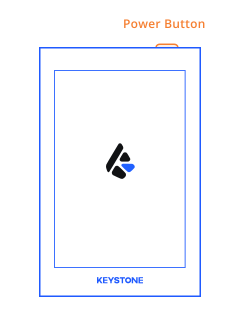
3. Connect the battery pack to the Keystone device and hold down the power button for 3 seconds to turn on the device.
'/%3e%3crect%20x='18'%20y='59'%20width='44'%20height='1.5'%20fill='%2383868F'/%3e%3ccircle%20cx='29'%20cy='15'%20r='2'%20fill='%23E0516E'%20fill-opacity='0.24'/%3e%3ccircle%20cx='51'%20cy='15'%20r='2'%20fill='%23E0516E'%20fill-opacity='0.24'/%3e%3c/svg%3e)