Keystone × Zcash

Zcash Hub

Explore privacy, wallets, security, and the tools built for ZEC.

Understand how Zcash works, explore its wallet ecosystem, and find a safer way to protect your ZEC.

Zcash ZEC Keystone hardware wallet displaying Zcash

Learn at your own pace

Explore Zcash

Choose a topic to understand the essentials, then follow the details that matter to your setup.

One ZEC, different visibility

How does Zcash provide privacy on a public blockchain?

Zcash uses zero-knowledge proofs to validate shielded transactions without disclosing the protected sender, recipient, or transferred amount on the public blockchain. ZEC remains the same Zcash network asset whether it is held in the transparent, Sapling, or Orchard pool.

Moving ZEC from the transparent pool into a shielded pool is called shielding; moving it back is called deshielding. If a transaction touches the transparent side, the associated addresses and amounts are public. The pools a wallet supports determine which transaction types its users can actually perform.

  • Zero-knowledge proofs validate without revealing plaintext
  • ZEC can move between value pools
  • The wallet determines available pools and transaction types

Transparent and protected

Transaction composition determines what is visible on-chain

Zcash transactions can contain transparent or shielded components. A fully shielded transaction can hide the sender, recipient, and transferred amount from public blockchain observers while still allowing the network to verify that the transaction is valid. If a transaction includes a transparent input or output, the addresses and amounts associated with the transparent component are public.

Even when a transaction is fully shielded, the transaction record, fee, and confirmation time remain observable on-chain. Network metadata or transaction IDs, amounts, and counterparty information shared off-chain may also create linkages.

Transparent

Public record
  • Addresses and amounts associated with transparent inputs or outputs are recorded publicly on-chain.
  • Relationships involving the transparent component may be analyzed and linked.
  • Specific support depends on the wallet or service.

Shielded

Encrypted protection
  • A fully shielded transaction can hide the sender, recipient, and transferred amount.
  • The transaction's existence, fee, and confirmation time remain visible.
  • Requires wallet support for the relevant shielded pool and workflow.
  • Transparent components: associated addresses and amounts are public
  • Shielding or deshielding: information on the transparent side is public
  • Fully shielded: addresses and amounts are hidden, but the fee remains visible

A new generation of shielded pool

How does Ironwood strengthen Zcash's long-term security?

Ironwood is a new shielded pool and v6 transaction format introduced with NU6.3. It reuses Orchard's core protocol and Halo2 proof system while maintaining its own commitment tree, nullifier set, and value-pool accounting. Funds migrating from Orchard into Ironwood pass through the publicly accounted turnstile, strengthening the network's ability to verify the circulating ZEC supply and reducing supply-integrity uncertainty associated with the previously remediated Orchard vulnerability.

Ironwood also adds quantum recoverability for newly created shielded notes. If quantum computing eventually threatens the current spend-authorization mechanism, a user holding the correct recovery material may still be able to regain control of the funds. This is a recovery safeguard, not complete post-quantum security. Users need an NU6.3-compatible wallet and firmware and should follow the official migration workflow.

  • NU6.3: the new Ironwood pool and v6 transaction format
  • Orchard to Ironwood: turnstile accounting strengthens supply verification
  • Quantum recoverability: a long-term recovery safeguard, not complete post-quantum security

Viewing and spending authority

How can an online wallet show a balance without directly spending ZEC?

A shielded account can separate viewing authority from spending authority. Depending on the integration, the online wallet uses the information required for account synchronization to scan encrypted on-chain records that belong to the user, calculate the balance, and construct transactions. That information is not the spending key that can authorize ZEC transfers.

Keystone isolates the spending key and receives signing requests by QR code. The wallet continues to handle synchronization, transaction construction, and broadcasting, while Keystone reviews and authorizes the fields it can parse in an offline environment.

  • Viewing authority is not spending authority
  • The wallet synchronizes, constructs, and broadcasts
  • Keystone isolates the spending key and authorizes spending

Two different protections

Shielded protects on-chain privacy; Keystone protects spending authorization

The shielded protocol can reduce information disclosed on the public blockchain, but it cannot stop malware from stealing a seed phrase or spending key, or stop a compromised wallet from constructing a signing request that does not match the user's intent.

Keystone isolates the spending key from the online environment and lets the user review transaction fields the device can parse. It does not hide IP-based network metadata for the online wallet or revoke viewing information already shared with a wallet or third party. Device review, recovery backups, and small test transactions therefore address different risks.

  • Shielded: protect on-chain transaction information
  • Keystone: isolate the spending key
  • User: review authorization and protect recovery material

From network to signing

Which ecosystem roles sit behind a ZEC transaction?

Zcash is not operated by a single wallet or company. Full nodes such as Zebra verify that transactions and blocks follow the consensus rules and propagate data across the network. Wallets such as Zodl, Vizor, and Noir synchronize accounts and construct transparent or shielded transactions according to the features they support, while exchanges, payment services, and block explorers provide access to trading, payments, and on-chain information.

Keystone sits at the signing layer. It does not replace the wallet or node; through compatible QR integrations, it isolates the spending key, parses the request, and signs the transaction. Two products that both “support ZEC” may not support the same shielded pools or transaction capabilities. What is actually available depends on the wallet, Keystone firmware, and specific integration version.

  • Nodes: validate rules and propagate network data
  • Wallets and services: determine available features and transaction composition
  • Keystone: review and authorize spending offline

Check the actual path before sending

One payment address can contain multiple ways to receive

A Zcash Unified Address can contain Orchard, Sapling, or transparent receivers. The sender's wallet selects the highest-priority receiver it supports, so seeing a Unified Address does not by itself guarantee a fully shielded transaction. Before sending, confirm the receiver and source of funds the wallet will actually use.

Before moving a significant balance, test the complete send-and-receive flow with a small amount and review the destination, amount, and transaction type that Keystone actually parses. If privacy matters, avoid casually sharing transaction IDs, amounts, or counterparty information.

  • A Unified Address can contain multiple receivers
  • The sender's wallet selects a supported receiver
  • Test with a small amount and review the fields shown on the device

A custody decision, not just a wallet choice

Choose How to Protect Your ZEC

Compare the tradeoffs of common storage methods. The right setup depends on how often you transact, how much responsibility you want, and which risks matter most.

Compare by
01

Centralized Exchange (CEX)

Best for

Built for trading and liquidity

Best suited for frequent trading, fiat on- and off-ramps, and funds that need to remain readily accessible.

Frequent tradingFiat access
Asset and Key Control

Custody remains with the platform

The exchange controls the private keys. You access your assets through an account and depend on the platform for recovery and withdrawals.

Platform custodyAccount access
Privacy and Shielded Support

The exchange still sees your account activity

Some exchanges support withdrawals to Shielded addresses. However, the exchange can still associate your balance, trades, deposits, and withdrawals with your account and, where identity verification applies, with your identity.

Account linkedPlatform-visible
Transaction Verification

Reviewed within the exchange

Trades, transactions, and withdrawals are typically reviewed and confirmed through the exchange’s website or app.

Platform interfaceAccount authorization
Wallet and Ecosystem Compatibility

Defined by the exchange

Available assets, Zcash features, deposit types, and withdrawal options are determined by the platform.

Platform-definedWithdrawal dependent
Main Risks

Custody and account risks

Key risks include account compromise, data breaches, asset freezes, platform failure, and withdrawal restrictions.

Asset freezesData breaches
02

Self-Custodial Software Wallet

Best for

Fast access for everyday use

Best suited for everyday payments, quick access, and frequent wallet activity.

Everyday paymentsQuick access
Asset and Key Control

Self-custody on a connected device

You control the recovery material and private keys and are responsible for securely backing them up and restoring access.

User-controlled keysSelf-managed recovery
Privacy and Shielded Support

Privacy depends on wallet and transaction support

Fully Shielded transactions can hide the sender, recipient, and amount from public blockchain observers. Privacy may still be affected by the wallet implementation, network connections, and transaction type.

On-chain privacyWallet-dependent
Transaction Verification

Reviewed on the connected device

Transaction details are displayed and confirmed on the same internet-connected phone or computer running the wallet.

Same deviceInternet connected
Wallet and Ecosystem Compatibility

Defined by the wallet

You can use the Zcash features, address types, and transaction types supported by the selected software wallet.

Wallet-dependentDirect access
Main Risks

Malware and key exposure

Key risks include malware, phishing, malicious extensions, and exposure of private keys or recovery backups.

PhishingKey exposure
03

Hardware Wallet

Best for

Designed for long-term protection

Best suited for long-term holdings and reducing the exposure of spending keys.

Long-term holdingsStronger key isolation
Asset and Key Control

Self-custody with separate signing

You control the recovery material and spending authority, while transaction signing takes place on a dedicated device. Backup and recovery remain your responsibility.

User-controlled keysDedicated signing
Privacy and Shielded Support

Shielded support requires integration

Support depends on integration between the hardware device and a compatible Zcash wallet. Shielded transactions can be authorized while spending keys remain isolated inside the hardware device.

Integration requiredSpending keys isolated
Transaction Verification

Verification depends on screen and transaction support

Screenless devices such as Tangem rely on the connected phone for transaction review. Small-screen devices such as Ledger Nano can confirm supported details, but readability and decoding vary by integration. Keystone 3 Pro uses a 4-inch touchscreen to review supported, parsed transaction details before QR signing. For Zcash, the fields shown depend on wallet and firmware support.

Verification model variesIntegration-dependent
Wallet and Ecosystem Compatibility

Defined by wallet integration

Available features depend on whether the hardware device has been integrated with the Zcash wallets and transaction types you want to use.

Wallet integrationDevice compatibility
Main Risks

Backup, authorization, and firmware risks

Key risks include losing or exposing recovery backups, approving a transaction that does not match your intent, installing compromised or unverified firmware, supply-chain tampering, and undiscovered hardware or software vulnerabilities. Hardware wallets reduce online key exposure but do not eliminate operational or implementation risk.

Backup loss or exposureFirmware and approval risk
The online wallet determines which Zcash features you can use; the hardware signer determines whether the spending key must enter an online environment.

Verified ecosystem support

Keystone Across the Zcash Ecosystem

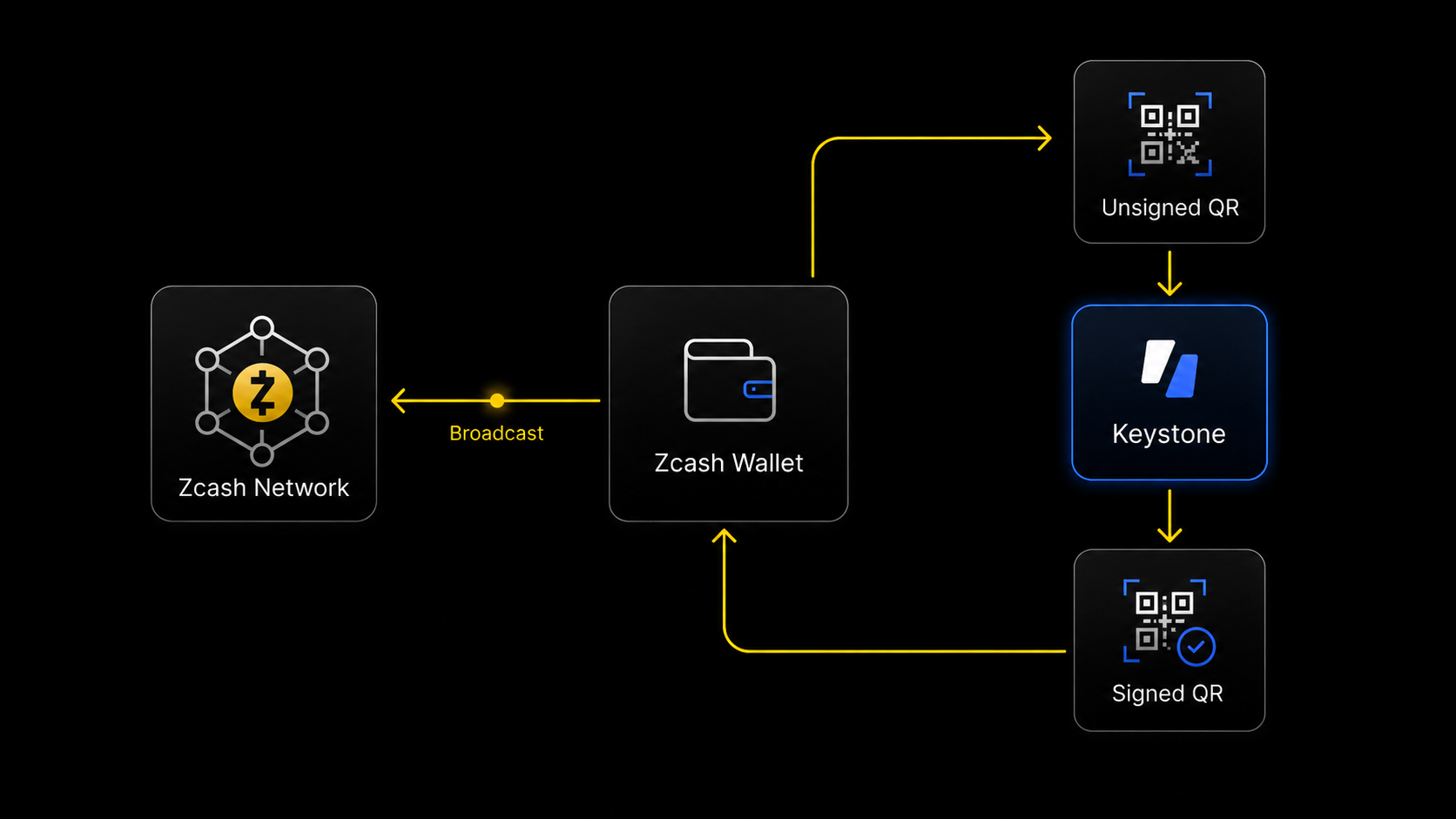
A compatible wallet synchronizes with the Zcash network, constructs the transaction, and generates a signing request. Keystone isolates the spending key, reviews and signs offline, and returns the result for the wallet to broadcast.

A Zcash wallet displays an unsigned QR for Keystone to scan and sign offline. Keystone returns a signed QR to the wallet, which broadcasts the transaction to the Zcash network.

Noir

Browser
Shielded supportedQR signing
Minimum firmware
2.5.0 (Cypherpunk)
Official sources3
01

Keep keys offline

Seed phrases and private keys do not need to enter the browser, phone, or computer.

02

QR code signing

The wallet encodes an unsigned request as a QR code. Keystone scans, reviews, and signs it, then returns the result by QR code without sending the spending key through a phone, computer, or network.

03

Verify on device

Review supported transaction details on an independent hardware screen before approval.

04

Use multiple wallets

The same Keystone can connect to multiple compatible wallets without exporting the seed phrase, but the accounts, pools, and history each wallet can display depend on its specific integration.

Compatibility, upgrades, and security

Zcash Security & Ecosystem Updates

Follow the latest developments in Keystone and Zcash wallet compatibility, security upgrades, and ecosystem support.

From setup to signing

Zcash & Keystone FAQs

Answers to the questions that often come up when turning a Zcash wallet and Keystone into one working setup.

01Why do I still need a Zcash wallet when using Keystone?

The Zcash wallet and Keystone do different jobs. The connected wallet checks the network, shows balances, prepares transactions, and broadcasts signed results. Keystone keeps the spending keys offline and signs supported requests after you review them on the device.

02Why does shielded support still depend on the wallet if Keystone supports Zcash?

Keystone protects the keys and authorizes supported transactions, but the connected wallet must first build the correct Zcash transaction. Shielded use therefore depends on the wallet, its supported Zcash pool and transaction type, the Keystone integration, and the firmware version shown in the compatibility list.

03Are all my transactions automatically shielded when I use a shielded-compatible wallet?

No. A wallet may support shielded transactions without using a fully shielded path for every transfer. Before sending, check the source of funds, recipient type, and transaction summary in the wallet; a transaction involving a transparent address exposes the information associated with that transparent side on-chain.

04What do the QR codes contain, and can they expose my seed phrase or private keys?

Connection QR codes provide the information a wallet needs for account discovery or synchronization, and the exact contents depend on the integration. They may include public keys or viewing information, but not the seed phrase or spending key. Viewing information can itself reveal balances or transaction history and should not be treated as data that is safe to publish freely. Transaction QR codes carry an unsigned request or its signed result. Only scan connection or signing requests within the documented Keystone workflow, and review each request on the device.

05What can Keystone protect if my phone or computer is compromised?

Keeping the spending keys offline can prevent malware on the connected device from directly extracting them. It cannot guarantee that a compromised wallet shows the correct recipient, amount, or transaction path. Treat the Keystone screen as the approval boundary and reject any request whose supported, parsed details do not match your intent.

06Do I need Keystone to receive ZEC?

Receiving normally does not require a transaction signature. Use a compatible wallet to display the intended Zcash receiving address, verify the network and address path, and make a small test transfer before sending more. Keystone becomes necessary when a supported operation requires authorization from the offline spending key.

07Can I switch between Zodl, Vizor, Noir, and other compatible wallets and see the same account?

Do not assume every compatible wallet will display the same addresses, shielded pools, history, or balance automatically. Account discovery depends on each wallet's Zcash support and Keystone integration. Connect Keystone through the wallet's official guide, compare the derived receiving address, and never import the seed phrase into the software wallet just to make an account appear.

08I already hold ZEC in a software wallet. Should I import its seed phrase or create a new Keystone wallet?

If the goal is to move from hot storage to cold storage, create a new recovery phrase offline on Keystone, verify its backup, and transfer a small test amount before moving the remaining ZEC. Importing a seed that previously existed on an internet-connected device cannot undo its earlier exposure. Never enter a newly created Keystone recovery phrase into a phone, browser, or computer.

Loading update…

Zcash community offer

Unlock 5% Off

Use this code to save 5% on Keystone 3 Pro. The discount will be applied automatically when you continue to the product page.

Discount codeshielded
Claim 5% Off →